Print a Chart
Printing a chart creates a PDF copy of the chart that is stored in HST Practice Management. The PDF is available for viewing or printing in HST eChart or transmitting electronically.
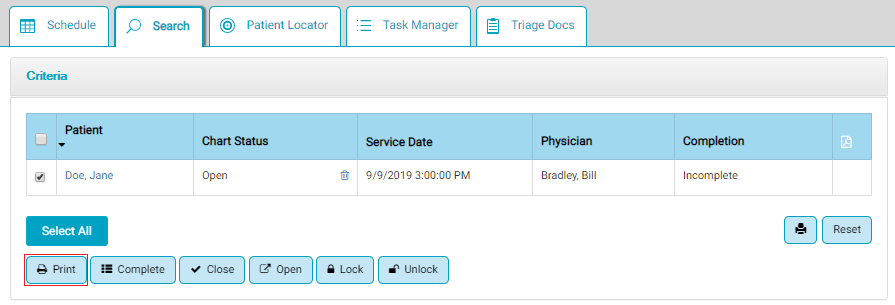
Charts are printed from the Search Tab in HST eChart.
Required Permissions:
In order to print a chart, a user must have "Case - Document Central" and "EHR Admin - Print Chart" permissions assigned in HST Practice Management.
To Print a Chart:
- Navigate to the Search tab.
- Search for the chart to be printed.
- Check the checkbox to the left of the Patient name.
- Tap the Print button. A spinning green gear icon displays in the PDF column while the PDF is generated.
- Once the PDF is successfully created, the PDF icon will display in the PDF column. A copy of the PDF will also be located in HST Practice Management in Document Central at the visit level.
- Tap on the PDF icon to open and print the chart.